In this guide
Teachers and presenters increasingly rely on interactive boards to engage students, streamline instruction, and boost collaboration. This guide highlights five leading options that blend touch responsiveness, content sharing, and robust performance. Each entry includes key features to help schools and households choose the right fit for their needs, from classrooms to home offices.
| Product | Brand | Display Size | Notes |
|---|---|---|---|
| RAIZEA Smart Board 55 Inch | RAIZEA | 55″ | Android-based, WiFi 6, 20 touch points |
| JYXCN 49″ Digital Interactive Smart Board | JYXCN | 49″ | Android OS, screen sharing, annotation |
| NEWORK 55 Inch 4K Smart Board | NEWORK | 55″ | Android 14, Google EDLA-Certified, 4K |
| COOLHOOD 65″ Smart Board | COOLHOOD | 65″ | 4K, multi-touch, app ecosystem |
| Imitation Book: Interactive & Fun Learn to Talk Board Book | Twin Cities Speech Therapy Publishing | Board book | Early language development |
RAIZEA 55-Inch Smart Board

The RAIZEA smart whiteboard combines an Android 11 system with a Cortex-A55 quad-core processor, 4 GB RAM, and 32 GB ROM to deliver smooth performance for teaching, coaching, or home use. It functions as a whiteboard, computer, tablet, and projector in one, making it a versatile tool for classrooms and remote learning environments. The device supports up to 20 touch points for collaborative activities and can generate QR codes from files for easy sharing. Connectivity includes WiFi 6 and multiple ports for easy linking to smartphones, tablets, laptops, and other devices.
Key features include quick response writing with 2 mm accuracy and an 8 ms latency, ensuring natural inking and minimal lag. The all-in-one design reduces setup complexity, while the touch response and multi-user support enable group activities, brainstorming, and interactive lessons without friction. This board is suitable for home offices, classrooms, and teaching studios where an integrated, responsive interactive display is desirable.
Imitation Book: Interactive & Fun Learn to Talk Board Book

This book is a teaching resource focused on early language development for toddlers aged 0-4. While not a traditional interactive board, it complements digital boards by promoting verbal interaction, turn-taking, and word-building activities. The content can support teachers and parents in reinforcing language skills outside screen-based lessons, making it a useful adjunct in early childhood education settings.
JYXCN 49″ Digital Interactive Smart Board
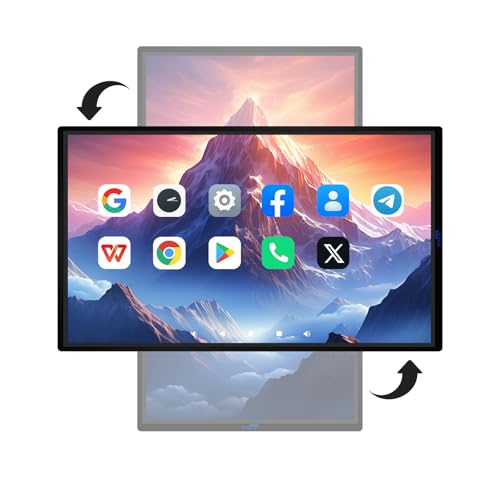
The JYXCN 49-inch interactive whiteboard runs on Android OS (Android 12.0 with 8+64 GB) and supports 5G Wi-Fi, horizontal and vertical viewing, and multi-user collaboration. It supports wireless content sharing and annotation, with the ability to project presentations and enable real-time editing by multiple users. The board is designed for classrooms, meeting rooms, and home offices where remote collaboration and dynamic content presentation are important.
NEWORK 55 Inch 4K Smart Board
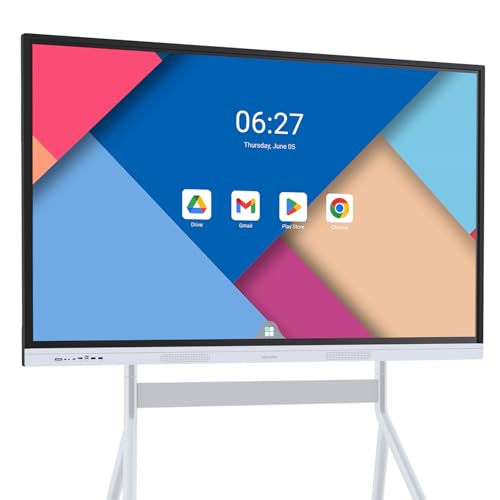
The NEWORK 55-inch 4K smart board is Google EDLA-certified and runs Android 14 with 8 GB RAM and 64 GB ROM. It enables full access to Google Play, Google Workspace, and Google Education Suite, with strong privacy features and OTA updates. The 4K display with 178-degree viewing angle and 81% NTSC color gamut provides crisp visuals and clear legibility for lectures, diagrams, and multimedia content. The device supports wireless casting and multiple user interaction, helping to facilitate hybrid teaching and collaborative projects.
COOLHOOD 65-Inch 4K Smart Board

The COOLHOOD 65-inch interactive whiteboard delivers 4K resolution with 20-point multi-touch and an octa-core processor (4 A73 + 4 A53) to support demanding tasks. It runs Android 13 with a substantial storage footprint and supports wireless screen sharing across devices and platforms. Built-in tools for smart voting, screenshot capture, and timers facilitate collaborative decision-making in classrooms and offices. The package includes a wall mount; a stand is available separately for flexibility in different room layouts. This board is well-suited for large classrooms or collaborative spaces needing a bright, expansive display.
Buying Guide
- Display size and resolution: Larger boards (65 inches) support more immersive teaching but require more space. 4K resolution provides sharper text and media; verify color accuracy and viewing angles for your environment.
- Touch and input: Look for multi-touch support (at least 10–20 points) for group activities. Check latency and pen-to-paper feel to ensure natural writing.
- Operating system and ecosystem: Android-based boards offer app ecosystems and easy file sharing. Some boards provide Google Workspace integration, while others emphasize proprietary app ecosystems.
- Connectivity: WiFi compatibility (including WiFi 6 if available), Bluetooth, and wired ports (HDMI, USB, USB-C) enable seamless connection to laptops, tablets, and cameras. Wireless casting and screen sharing streamline presentations.
- Collaboration features: Annotation tools, real-time multi-user editing, QR code sharing, and ability to save and export notes or documents improve classroom collaboration and record-keeping.
- Setup and mounting: Consider whether a wall mount or stand is included. For flexible room layouts, a standalone stand may be essential.
- Security and updates: Look for devices with OTA updates and enterprise-grade privacy features, especially in school settings with multiple users and devices.
- Budget and maintenance: While higher-end boards offer robust features, evaluate total cost of ownership, including accessories and potential service plans.
- Use-case alignment: For early learning, complementary printed resources may be valuable alongside interactive boards; for higher education or corporate training, focus on advanced collaboration and content management.
These considerations help compare devices across classroom needs, home learning setups, and hybrid teaching environments. Each option above provides different strengths—whether it’s native Android performance, Google Workspace integration, or large-format collaboration—so selecting the best fit depends on room size, desired features, and workflow needs.